SEO
The system does most of the work for search engines by itself: readable addresses, descriptions, canonical addresses, the sitemap, structured data and feeds. In Settings → SEO and GEO you decide only about the main things. This page describes the site settings, the options for an article and redirects. The options for AI search engines from the same tab have their own page, AI search engines.
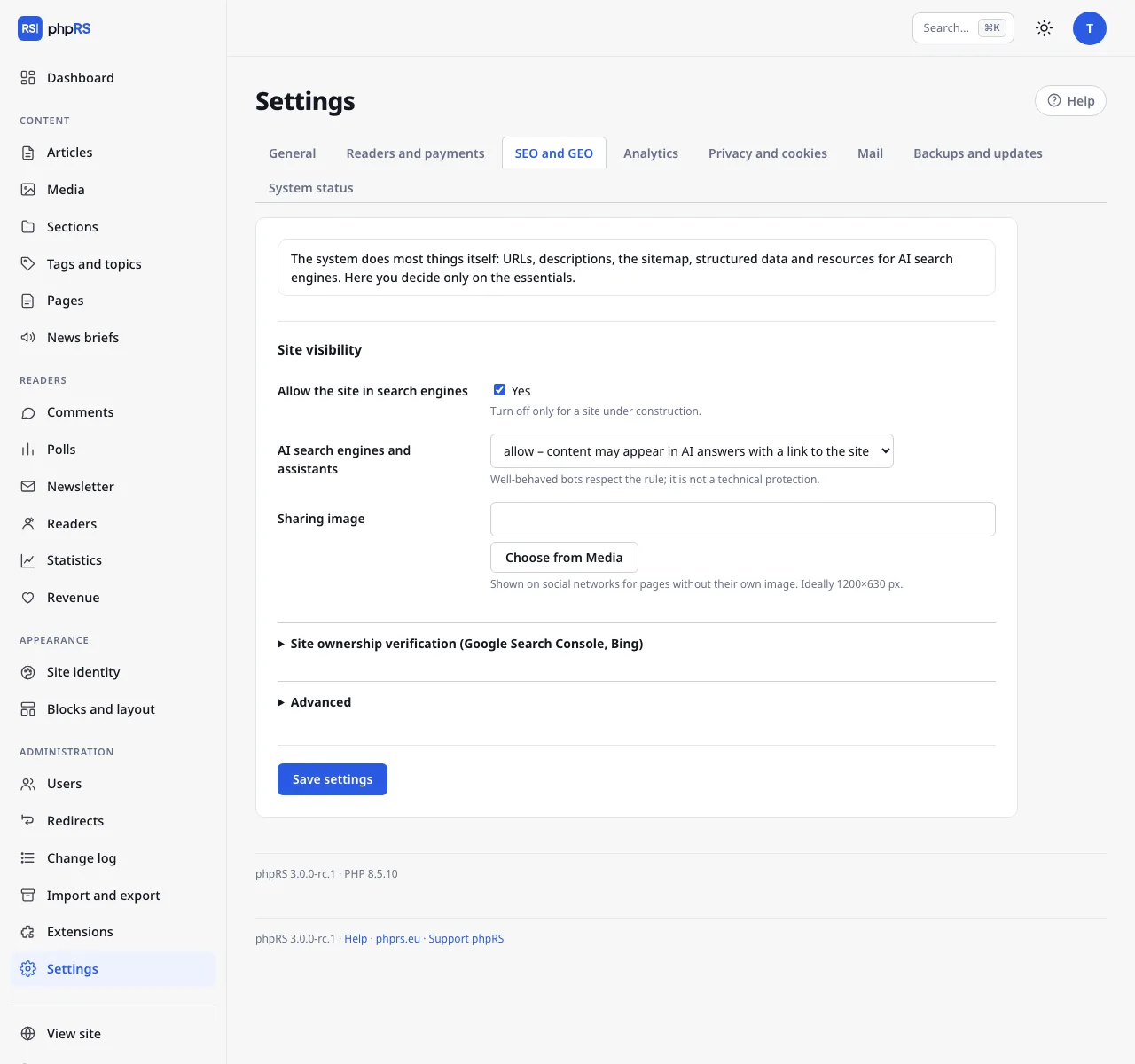
Site visibility
| Field | Meaning | Default |
|---|---|---|
| Allow the site in search engines | The main switch for indexing. Turn it off only for a site under construction. | on |
| AI search engines and assistants | see AI search engines | allow |
| Sharing image | Shown on social networks for pages without an image of their own. Ideally 1200×630 px. | empty |
When you turn Allow the site in search engines off, the robots.txt file disallows crawling of the whole site and all pages get the noindex tag. No notification is sent through IndexNow either. Do not forget to turn the option on before launching the site.
Site ownership verification
Expand Site ownership verification (Google Search Console, Bing):
- In Google Search Console choose verification by HTML tag and copy the
contentvalue from thegoogle-site-verificationmeta tag. Paste it into the Google field. - For Bing Webmaster Tools paste the
contentvalue from themsvalidate.01meta tag into the Bing field. - Save and finish the verification in the service.
- Then enter the sitemap address in the service – it is shown below the fields, for example
https://www.example.com/sitemap.xml.
What the system generates
Links to these files (except /podcast.xml) are at the end of the expandable Advanced section.
| Address | Content |
|---|---|
/robots.txt | Rules for robots and a link to the sitemap. It always disallows /admin.php, the search and article previews. |
/sitemap.xml | The sitemap: the home pages of all language versions, sections, pages and up to 45,000 articles with the date of the last change. There is one for all languages. |
/sitemap-news.xml | The sitemap for Google News: articles from the last two days. |
/rss.xml | The RSS feed: the 20 latest articles, headline and standfirst. |
/feed.json | JSON Feed 1.1: the 20 latest articles including the text. |
/podcast.xml | The podcast feed for Apple Podcasts, Spotify and other apps: articles with an audio file (mp3, m4a, ogg, oga, wav, aac), at most 300 episodes. Locked articles are not in it. |
Briefs and articles with the noindex option are not included in the sitemaps. On a multilingual site the RSS, JSON Feed, podcast and the Google News sitemap have their own version under the language prefix (/en/rss.xml).
The podcast cover is the Sharing image; when it is missing, the site logo is used. How to turn an article into an episode is described on the page Content types.
Advanced
| Field | Meaning | Default |
|---|---|---|
| schema.org structured data | JSON-LD tags by which search engines understand the content. | on |
| Notify search engines of new articles (IndexNow) | Bing, Seznam and Yandex learn about an article straight away. | off |
| llms.txt file, Clean version of articles (.md) | see AI search engines | on |
| Custom robots.txt rules | Lines that are appended to robots.txt after the system's rules. | empty |
Structured data
With the option turned on, the system inserts:
- for the whole site, data about the site and the publisher including the search box,
- for an article, the
NewsArticletype with the headline, dates, author, image and publisher, and breadcrumb navigation (site → section → article), - for live coverage, the
LiveBlogPostingtype with the individual entries, - for an article with questions and answers,
FAQPage, - for a review, the rating and the item reviewed,
- for an article with audio or video, data about the media,
- for a locked article, the paid content flag (see Locked content).
You do not fill in any of this separately – the data are taken from the article.
IndexNow
After it is turned on, the system creates a key when the settings are saved and exposes it on the site as a text file; you do not set anything else. A notification goes out when an article is published (a scheduled one too) and when a published article is edited later. Articles with the noindex option are not announced. Nothing is sent at the localhost address or on .test domains.
Options for an article
The article form has, in the expandable More settings section, three fields for search engines:
| Field | Meaning |
|---|---|
| Search engine title | A different headline for search results. Empty = the article headline. |
| Search engine description | At most 320 characters. Empty = the beginning of the standfirst. The AI assistant can suggest one too. |
| Hide from search engines (noindex) | The article stays on the site but gets the noindex tag, drops out of the sitemaps and is not announced (IndexNow, Web Push, webhook). The automatic newsletter does not include it. |
The canonical address, the Open Graph tags for sharing and, for language versions, the hreflang tags are added by the system by itself. The description and keywords of the whole site are in Settings → General: Site description in the Website section, Site keywords in the expandable More options section.
Redirects
The Redirects extension is turned on after installation. An administrator manages it in Administration → Redirects.
The most common case is handled by the system by itself: when you change the address of a published article, a 301 redirect from the old address to the new one is created. No chains arise – older redirects are rewritten to the new target.
A manual redirect:
- At the top of the form fill in the Old address – a path on this site that no longer exists, for example
/stara-stranka.html. - In Redirect to enter the target: a path (
/clanek/nova-adresa) or a whole addresshttps://…. - Click Add redirect.
A redirect is used only when there is nothing at the old address. It does not override an existing page. For every record the table shows how many times it was Used.
Below it is the overview Addresses readers could not find (404) – the 25 most frequent ones in the last 60 days with a count and a date. The Redirect link next to an address pre-fills the form, so you redirect a missing page in two clicks. Clear the list deletes the list.