Site languages
phpRS can run a site in one language as well as a site with several language versions side by side. This page describes how to turn languages on and what the system translates by itself. Working with content is described on the page Translating content.
Four languages are available: Czech, Slovak, English and German.
Default language
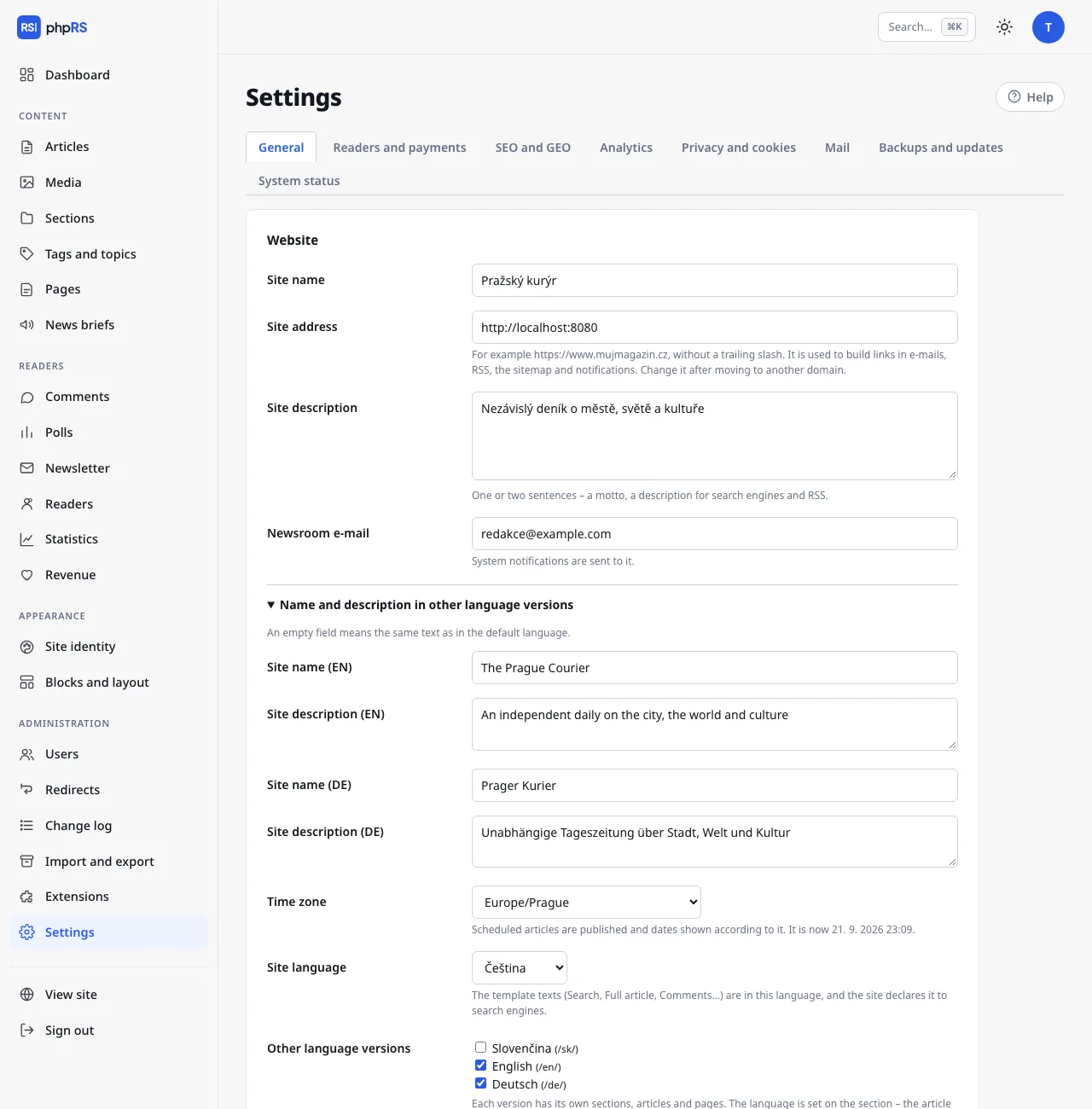
Every site has one default language. It is set in Settings → General in the Site language field; during installation the language in which you installed is taken over.
The template texts are in this language – Search, Read more, Comments, form texts, e-mails to readers – and this is how the site declares itself to search engines (the lang attribute, Open Graph, structured data). Content in the default language lives at addresses without a prefix: /clanek/…, /rubrika/….
A site in a single language needs nothing more. The language of the administration has nothing to do with the language of the site; every user chooses it under My account.
Other language versions
- Open Administration → Extensions, tick Language versions of the site and save.
- In Settings → General, Other language versions appears below the Site language field. Tick the languages you want to add and save.
- Further down expand Name and description in other language versions and fill in the Site name and Site description for every version. An empty field means the same value as in the default language.
- For every version create at least one section in the given language – see Translating content. Without a section a version has nowhere to store articles.
Every other version lives at an address with a language prefix: /en/, /de/, /sk/. It has its own home page, sections, articles, pages, tags, archive, search and feeds (/en/rss.xml, /en/feed.json). Files, images in media/, the sitemap and the API are shared.
After the extension is turned off, the content of the other versions stays in the database but stops being available on the site. After it is turned on again, it comes back.
What is translated by itself and what is not
| Part of the site | Who translates |
|---|---|
| Template texts: navigation, buttons, form labels, messages, pagination, the 404 page | the system – the dictionaries are part of phpRS |
| E-mails to readers: subscription confirmation, registration, sign-in link, newsletter footer | the system – in the language of the version on which the reader performed the action |
| Default texts of blocks (the prompt of the Notifications, Support us and Reader account blocks) | the system |
| Cookie banner – buttons | the system |
| Date format | the system, see below |
| Site name and description | you, in Settings → General |
| Sections, articles, pages | the editorial team – every version has its own |
| News briefs and polls | the editorial team – the Language version is chosen for every item |
| Block headings, the Text and Menu blocks | the editorial team – a separate block for every language |
| The text of the cookie banner, the prompt text below a locked article, the maintenance mode text | not translated – one wording for the whole site |
Texts that you enter in Settings and that have no field for other languages are shown the same in all versions. For a bilingual site therefore write them briefly, or bilingually.
If a text is missing from a dictionary, it stays in Czech. The site does not break because of it.
Language switcher
All three built-in templates output a language switcher in the header – language codes (CS, EN, DE…) as links. The current language is highlighted. On a site with a single language the switcher is not output.
Where the switcher leads:
- for an article, a section and a page that have a linked translation, directly to the counterpart in the other language,
- otherwise to the home page of the given language version.
Linking translations is described on the page Translating content. The switcher offers only published articles and displayed sections and pages.
A reader who opens the address of an article in the wrong version (for example /clanek/… for an English article) is redirected to the correct address with the prefix.
hreflang tags
hreflang tags tell search engines that two addresses are language versions of the same content. The system inserts them by itself:
- on the home page they point to the home pages of all versions,
- for an article, section and page only to existing linked translations.
Content without a linked translation has no tags – otherwise the search engine would get a link to an unrelated page. Every version also declares itself with its own lang and og:locale (cs_CZ, sk_SK, en_US, de_DE).
Dates in language versions
| Language | Date with an article | Date in words in the header |
|---|---|---|
| Czech, Slovak | 18. 9. 2026 | names of days and months in the given language |
| English | 18 Sep 2026 | in English |
| German | 18.09.2026 | in German |
Decimal numbers (for example a review rating) have a point in English and a comma in the other languages. The time zone is one for the whole site – Settings → General → Time zone.
What is shared by all versions
- the template, the layout and Site identity,
- administration users and their permissions,
- Media,
- reader accounts and subscriptions,
- the SEO, analytics and cookie settings,
- the Front page screen – the manual order arranges only the home page of the default language; in the other versions articles are ordered by pinning and date.